
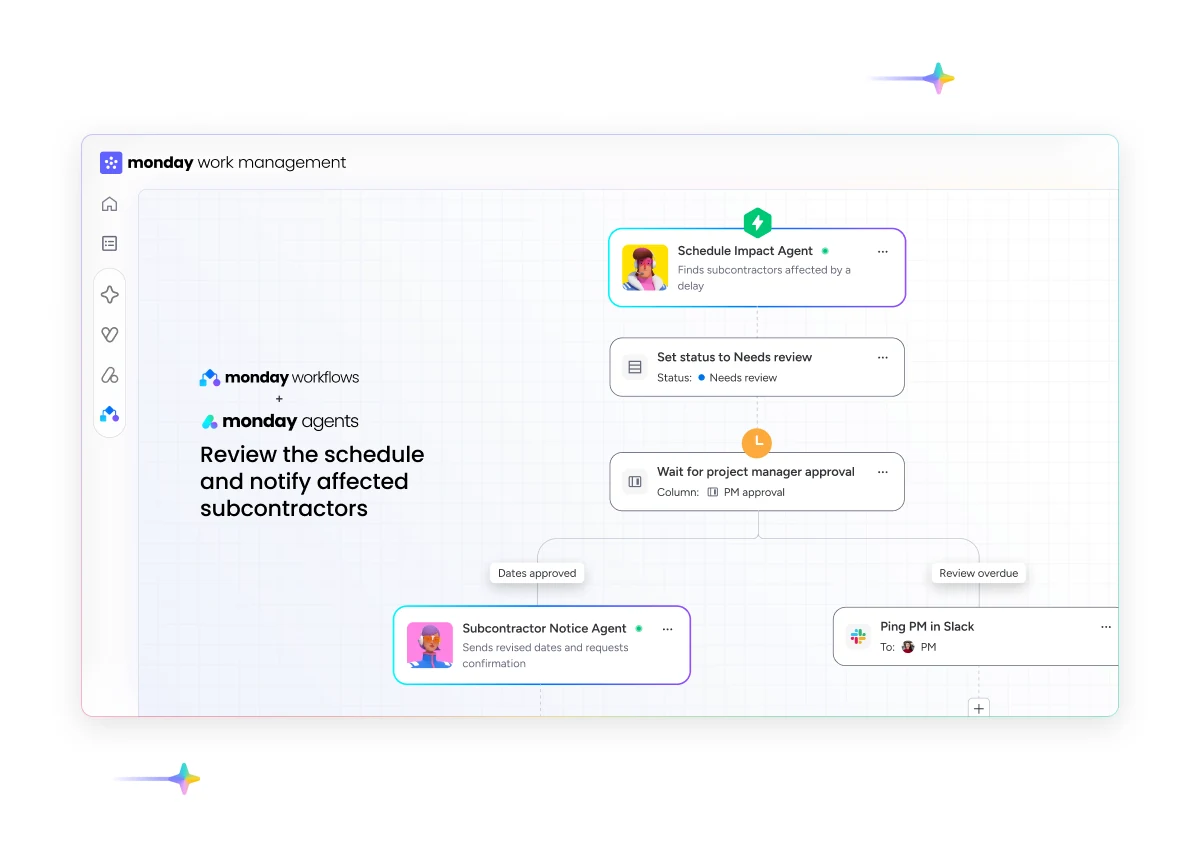
An AI agent in monday.com for construction monitors a defined process, reads authorized context from boards and documents, then prepares or performs actions under specific rules. Strong first use cases include jobsite summaries, bid preparation, document follow-ups and exception reporting. Pricing, contractual commitments and approvals remain under human responsibility.
Short answer: monday.com now provides an agent builder for agents that understand work context, select actions according to defined priorities and operate within configured boundaries. Horizon Nord applies this capability to construction operations while keeping a clear line between automated preparation and accountable decisions.
This is the central guide in our construction agent series. It explains the available technology, practical use cases, prerequisites and limits. The scenarios are implementation patterns. They are not client results, and feasibility depends on your data, plan and the feature rollout in your account.
What a monday agent is today
monday.com's official documentation defines monday agents as agents built into the platform. They can monitor activity, interpret permitted data, apply the rules and priorities they receive, then create or update items, assign owners, change statuses, draft messages and log outcomes. They work from triggers and recurring assignments called Jobs.
The feature is in gradual release, so the agent builder may not appear in every account yet. monday.com also states that agents operate inside configured permissions and guardrails. Their Activity log lets users review runs and errors. Check AI Agents on monday.com for current availability and capabilities.
The word agent should not replace every automation label. Four layers now coexist in monday.com.
| Layer | Useful construction role | Suitable trigger |
|---|---|---|
| Board automation | Apply a stable rule, such as notifying an owner when a date passes | A specific status, date or value |
| AI Workflow | Orchestrate several steps across boards, conditions, tools and AI blocks | A known event in a structured process |
| monday sidekick | Answer a one-time request, analyze a board or assist a user | A conversation started by a person |
| monday agent | Monitor, interpret and act repeatedly within a defined scope | An assignment, mention, schedule or event |
AI Workflows handle multi-step and cross-board processes. monday sidekick is the conversational assistant that responds on demand and can act on visible work. Agents pursue a mission according to their triggers. This distinction prevents a company from paying for a more complex layer when a fixed automation already covers the requirement.
Why construction is a good fit
A construction project creates a large amount of information before it creates a decision. Daily reports, photos, requests for information, drawing revisions, schedules, punch lists, invoices, payment applications and subcontractor follow-ups arrive at different times. The operating challenge is often to assemble enough context early enough for the responsible person to act.
monday.com already presents its construction platform as a place to share files, images, updates, RFIs and feedback, then track budgets, timelines and resources. Those foundations appear on its official Construction Management Software page. An agent becomes useful when the underlying data is structured well enough to read without guessing what each column means.
An agent cannot repair a confusing account by itself. If two statuses have the same meaning, dates are left stale or attachments arrive without a related project, the agent lacks dependable context. Account architecture still comes first: reference boards, owners, project relationships and naming rules.
The strongest use cases
Prepare a morning jobsite brief
The agent reviews authorized updates since the previous day, finds blocked items, slipping dates and decisions without owners. It prepares a brief per project and cites the source items. The operations leader reviews it before distribution. Our guide to an AI agent for daily construction reports in monday.com details the inputs, output and controls for this pattern.
Check a bid package
When an invitation arrives, the agent can create the file, extract stated dates, classify documents and flag missing pieces against a known checklist. It can also prepare follow-ups from project contacts. The estimator interprets drawings, chooses quantities, sets the price and authorizes submission. The full pattern appears in AI agents for construction bidding in monday.com.
Follow up on missing documents
The board records which certificates, technical sheets, shop drawings or confirmations are expected. The agent checks due dates and prepares a message with the right project, requested document and required date. A rule can require approval before any external message is sent.
Flag schedule exceptions
An agent can look for tasks with changed dates, affected dependencies and open responsibilities. A useful output is a traceable list: affected item, observed data, triggered rule, owner and next decision. Vague predictions do not give a project manager enough evidence to act.
Maintain a clean project record
When an update contains a decision, attachment or status change, the agent can suggest a filing location or complete defined fields. This maintenance looks modest, but it improves the context available to reports, dashboards and later agents.
The minimum architecture for a dependable agent
A construction agent should have a mandate short enough for the process owner to explain. We use six framing elements.
- A precise outcome. For example, prepare the daily brief for active projects before the coordination meeting.
- Named sources. The boards, groups, documents and fields available to the agent are written into the mandate.
- A controlled trigger. The schedule, mention or state change that starts the work is known.
- Limited tools. Read and write actions are separated. Each write tool receives the smallest useful scope.
- A verifiable output. The result cites its monday.com items and distinguishes missing data from normal data.
- An escalation rule. Important ambiguity goes back to a named owner.
monday.com says tools connected to an agent are classified as Read or Write. Write tools require review before activation. Creators can also restrict access to the boards and documents required by the mission. The Activity log shows runs, tools used and failures. These controls matter whenever an agent touches project commitments.
From jobsite signal to verifiable action
A useful agent does not simply receive "the whole project." Its context is assembled in layers, and each layer answers a different question.
The first layer is structured data. A status, date, owner or relationship between items has a stable meaning. The agent can compare a value with a rule without interpreting a complete paragraph.
The second layer is knowledge. It contains authorized procedures, definitions and reference documents: the daily-report format, escalation criteria, responsibility matrix or document checklist. This knowledge explains how structured data should be read. Instructions should always state which source prevails when a document and board disagree.
The third layer is the tool. A Read tool can find an item or consult a file. A Write tool can create a task, edit a status or draft a message. Tool scope should follow the mandate. A daily-report agent has no reason to edit a rate table or account settings.
The fourth layer is the Job. It combines a trigger with task-specific instructions. One agent may have a Job for the morning brief and another for a direct mention, but each Job keeps its own format, sources and escalation rule.
The final layer is execution evidence. The output contains links to used items, the period covered, missing data and actions performed. The Activity log adds a technical record. The accountable person can then answer three questions: what did the agent read, what did it conclude and what did it change?
This chain matters when information moves from field to office. A photo or note may indicate an issue, but it does not automatically become a decision. The agent connects it to the project and prepares the question. The project manager assesses impact and selects the action.
Deploy without disrupting operations
Deployment begins with a real process and a limited group. The team keeps working while the partner observes where information appears, who validates it and how errors are corrected.
The first state is observation. The agent reads data and writes output into an area reserved for responsible leaders. It changes no status and contacts no one. This period reveals ambiguous fields, poorly connected documents and vague rules.
The second state allows proposals. The agent suggests a classification, owner, task or draft. A person accepts or corrects it. Corrections improve the instructions and test set.
The third state allows a few reversible actions. Creating an internal task or completing a tracking field has less impact than sending an external message. Add actions one at a time with their permission and stop rule.
The fourth state is monitored operation. The process owner reviews errors, partial runs, credits and data changes. A new column, connected system or reassigned responsibility triggers an agent review.
This progression also supports adoption. Superintendents and coordinators can see exactly which information the agent uses. They can correct the structure before the briefs become a leadership reference.
Decisions that should stay with accountable people
Construction contains decisions whose impact extends beyond a board status. We recommend human approval before any of the following actions:
- confirming a price, credit or change order;
- promising a date to an owner, consultant or customer;
- interpreting a contract clause;
- approving an invoice or payment application;
- changing an official budget or forecast;
- sending a regulatory document;
- closing a safety or compliance issue.
The agent can collect the evidence, prepare a draft and flag an exception. The responsible person keeps authority and records the decision. This division improves preparation speed while preserving accountability.
Permissions, governance and credits
Admins can enable or disable AI capabilities at the account level. On Enterprise, AI governance also supports role-based access, agent types, selected workspaces, usage limits and an agent directory. monday.com notes that several controls are also in gradual release. Review AI Permissions and Governance before scoping a pilot.
Agents consume credits according to task complexity and depth. External research, long action chains and large data volumes can increase consumption. monday.com recommends granular instructions, narrowly scoped tools and Activity log review. The rates can change, so we avoid fixing a monthly usage estimate before observing the use case. The current rules are documented in AI Models and Credits.
When a simpler option is better
An agent adds maintenance, credits and another permission layer. It is not the right choice for every task.
A board automation is enough when the input, condition and action are always the same. An overdue date can trigger a fixed notification without contextual analysis. An AI Workflow is enough when the branches are known and the team wants every condition to remain visible. Sidekick is enough when a person occasionally asks a question about a board.
We also delay an agent when the process has no owner, essential data is often missing, rules change every week or nobody can review the results. In those cases, the first deliverable is a clearer work structure.
Some missions require specialized software or a regulated professional. Detailed quantity takeoff, design, legal analysis and safety decisions do not become suitable simply because a model can return an answer. monday.com can coordinate the requests, documents and approvals around that work while the responsible tools and professionals retain their roles.
How to choose the first pilot
The first agent should handle frequent, structured work that is easy to verify. A good candidate usually meets these conditions:
- the process already has an owner;
- data reaches monday.com or can be connected to it;
- the expected output has a clear format;
- a person can review the result quickly;
- an error remains visible and reversible;
- the frequency justifies maintaining the agent.
A daily jobsite brief is often a better pilot than an agent asked to revise a complete budget. The first mission quickly creates real examples for instruction tuning. The second combines too many financial and contractual rules for an initial deployment.
Where Horizon Nord fits
Horizon Nord is a Quebec-based certified monday.com partner. Construction is our primary specialization: general and specialty contractors, construction project teams and real estate developers. We can begin with a monday.com implementation for construction, then add an agent when the structure and use case support it. We can also work inside an existing account through our AI agents and automation service.
Partner selection matters when the process spans projects, external permissions or accounting tools. Our guide to choosing a monday.com partner for construction AI agents provides an evaluation framework that can be used with Horizon Nord or another agency.
Frequently asked questions
What can an AI agent do in monday.com for a construction company?
It can monitor authorized boards, summarize updates, classify requests, create or update items, assign owners, prepare follow-ups and flag exceptions. Its mandate, tools and permissions determine what it can actually do.
What is the difference between monday sidekick and a monday agent?
Sidekick is a conversational assistant used on demand. A monday agent pursues a mission through configured triggers and Jobs, including times when a person is not holding a conversation with it.
Are agents available in every monday.com account?
Availability is gradual and depends on the product, plan and account rollout. Check the administration interface and official documentation before scoping a pilot.
Can an agent send messages to subcontractors?
Agents can use external tools when the connection and permissions allow it. For communication that commits the project, we recommend human approval and a narrow sending scope.
Do we need to replace our field system or accounting software?
Usually no. monday.com can serve as a coordination layer and receive context from specialized systems. Our guide to AI agents without changing platforms explains that architecture.
Sources and editorial method
Guillaume McGee is a monday.com Consultant & Solutions Architect at Horizon Nord. He previously owned construction businesses. Platform capabilities in this guide were checked against official monday.com documentation on August 3, 2026. Use cases are implementation patterns from our scoping method. No client performance is attributed to these patterns. We will review this page when monday.com changes agent availability, permissions or pricing.
