
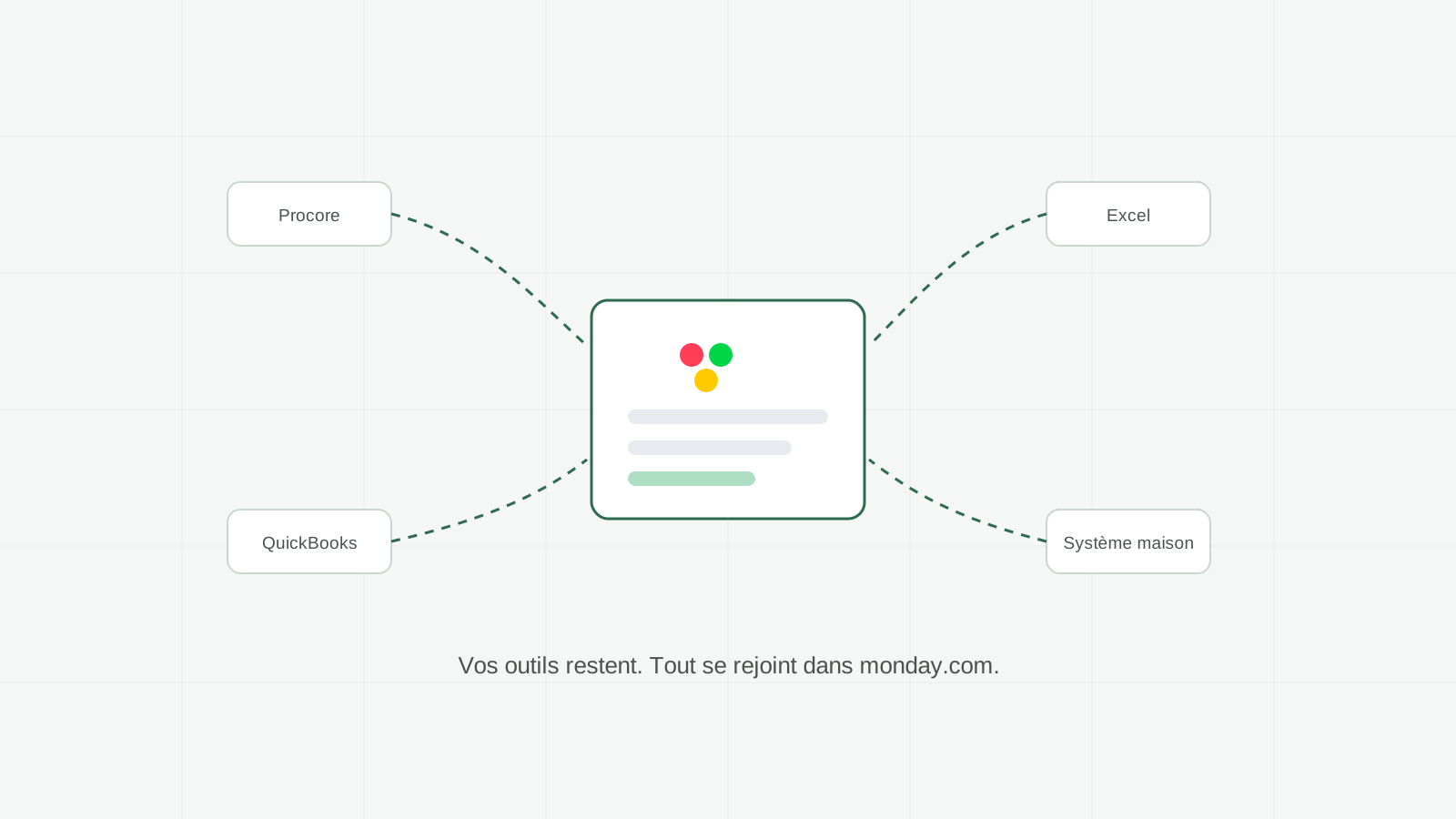
Having a complete system with AI agents means keeping specialized tools where they are useful and connecting them to a central hub: monday.com. The field system stays in the field, accounting software remains the financial reference, and useful data meets in boards where AI agents prepare work and flag what needs attention. The ground rule does not change: agents prepare, humans decide.
What this article explains: what "without changing platforms" concretely means, how your current tools connect to monday.com, what AI agents do and do not do inside it, and where to start.
The useful question is simple: can you add AI agents without ripping everything out? Yes. In construction and among materials manufacturers, suppliers and distributors, field tools, accounting, spreadsheets and production systems each have a role. A good system connects only the necessary data in monday.com.
What "without changing platforms" concretely means
The model looks like a hub, not a replacement. Each tool keeps the role where it is strongest, and monday.com becomes the place where information meets, gets structured and turns into decisions.
Concretely, three principles:
- The field keeps its tools. The app your superintendents open every morning does not change. This is non-negotiable: a system the site refuses is a dead system.
- The office gets a single source of truth. Instead of chasing information across five pieces of software and three inboxes, the office team finds it structured in monday.com boards.
- Connection uses the available APIs and automations. We define which data moves, in which direction, and how errors are handled. What is possible depends on the access each tool provides.
That is the difference between a migration and an integration. A migration moves everyone to a new tool, with the resistance, the training and the lost data that come with it. An integration respects what works and adds the missing layer: the big picture and the prepared work.
Three concrete examples
Three typical scenarios from construction and from the companies manufacturing, supplying or distributing its materials. They illustrate the mechanism, they are not client results: yours will depend on your tools, your processes and your data.
The field system stays in place
Your crews keep entering daily reports, photos and issues in the specialized tool already approved. Their workflow does not change during the first connection.
Behind the scenes, a connection feeds a monday.com board per project: progress by phase, open issues, pending requests for information. An AI agent reads that board every morning, spots what has not moved, prepares the coordination meeting summary and flags the two or three points that need a decision today. The project director opens one place instead of digging through three systems.
Accounting software remains the reference
Your accountant does not switch software. Invoices continue to be created in the official accounting system.
What changes is upstream. When a production phase or field milestone is confirmed complete in monday.com, billing information can be prepared: customer, amount, contract reference and attachments. An agent assembles the file and queues it for review. The coordinator checks every line, then the approved file moves to the accounting system. Human review remains mandatory.
Excel and homegrown systems (construction materials manufacturing)
Almost every construction materials or component manufacturer has one critical spreadsheet: the price list, the capacity grid, the supplier order tracker or the jobsite delivery schedule. And often a homegrown system built ten years ago that two people understand.
We do not tear that down overnight. We start by reading it: the file or the system feeds monday.com boards, where the information becomes visible to the whole team instead of living on one person's computer. Then, gradually, the processes that benefit from structure move into monday.com, one at a time. The spreadsheet stops being critical when the board has become the reference, not before.
What AI agents do inside this system
Once the hub is in place, agents work where information meets. Their job comes down to three verbs.
- Read. Walk the boards, the updates and the documents arriving from connected tools. Nothing gets lost, because everything lands in the same place.
- Prepare. Progress summaries, follow-up lists, draft follow-up emails, billing files: the compilation work that ate hours is done before you open the board.
- Flag. What is drifting, what is stalling, what needs a decision: the agent surfaces it instead of letting it hide in a column.
What is not in their job description: approving a price, sending a follow-up without review, committing to a deadline with a customer, changing a budget. Every commitment stays a human decision. That principle guides every configuration we ship, and it is what separates a dependable system from a black box.
These agents build on monday.com's native layers: Sidekick for quick everyday questions, monday workflows for automatic triggers inside your processes, and AI Agents for autonomous preparation sequences. This is exactly the stack we configure in our AI automation engagements. Our own tools, like Horizon Clock for time tracking and OCR by Horizon for document reading, are available exclusively with Direction by Horizon: they feed the same boards the agents then analyze.
What it is not
Let's be direct, because "integration" is a word that often hides less pretty realities.
It is not a magic sync. Connecting tools requires choices: which information moves, in which direction, at what pace. A bad connection gives you two sources of truth instead of one. That is why we map before we connect.
It is not a reason to keep a tool everyone hates. "No rip and replace" does not mean "keep everything". If a piece of software serves no one anymore, the integration is the opportunity to retire it cleanly. The principle protects what works, not what clutters.
The first stage can focus on one tool and one process. Measure what the connection changes before extending it; timing depends on the data, access and integrations involved.
How a sane implementation starts
The order of the steps matters more than speed.
- Map before connecting. Who enters what, in which tool, and which decisions follow. That map decides everything else.
- Build the hub first. The monday.com boards get structured with your team's real words before the first connection.
- Connect one tool at a time. Start with the source that creates the most re-entry, such as the field system, accounting software or a critical spreadsheet.
- Add agents where preparation is expensive. Summaries, follow-ups, billing. One use case at a time, measured, adjusted.
- Keep every commitment human. Prices, approvals, promises to customers: never delegated, even when the draft is good.
In construction businesses, the first finding is almost always the same: the information already exists, it is just scattered. The system does not create new information; it gathers it and prepares it.
That is exactly what a first conversation with us covers. In 45 minutes, no commitment, we look at your current tools and identify the first connection that would save you real time. Discuss your operations.
Frequently asked questions
Does monday.com replace specialized systems?
Not automatically. In this model, monday.com becomes the hub where useful information meets. Field and accounting systems can retain their role as official sources.
What happens to our data if we change our minds?
Your data remains in source systems and boards according to the chosen architecture. monday.com boards can be exported. Ownership, retention and deletion must be documented before connecting anything.
How long before the system works?
The pace depends on your environment. The recommended approach starts with one tool, one process and one agent, then measures the result before extending.
Can AI agents act inside our tools?
They read connected data and prepare work according to their permissions. Actions that commit your business, such as sending an invoice or approving a price, remain validated by your team.
