Tap-to-clock-in
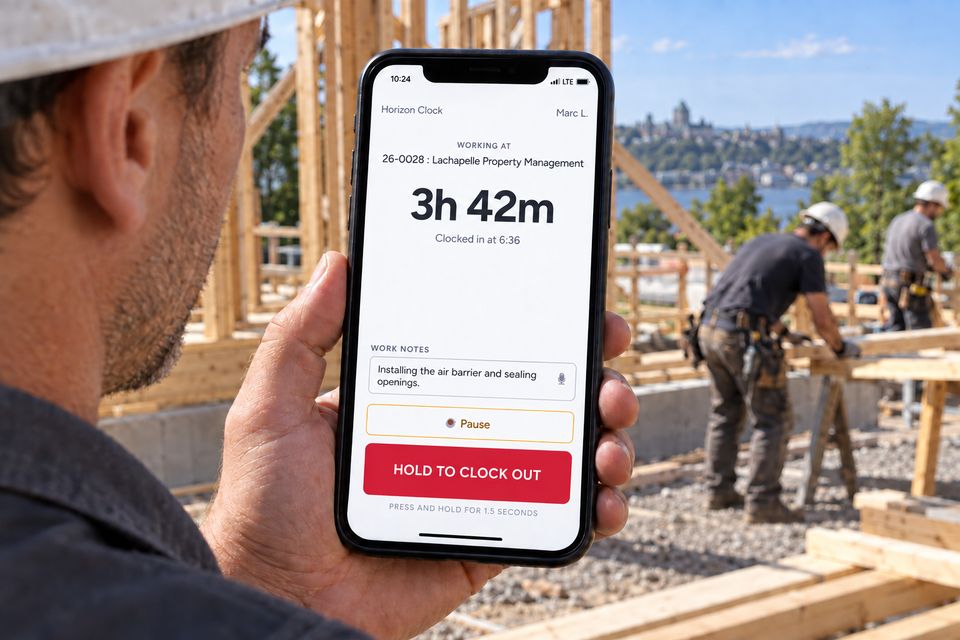
Tap once to clock in. To end the shift, hold the clock-out button for 1.5 seconds. Both actions happen on your phone.
Horizon Clock is available exclusively with Direction by Horizon for jobsite time tracking inside monday.com. Approved hours feed the budget and, for time-and-materials work, the invoice in preparation.
Explore Time Entries See how it works
Available exclusively with Direction by Horizon, through the Time Entries module.
Foremen text workers Friday afternoon to confirm their week. Workers swear they clocked in at 7. The hours don't quite add up. By the time payroll's processed, half the data is reconstructed from memory and the other half is approximated. The margin pays for the gap.
Horizon Clock connects the jobsite to the Time Entries module in Direction by Horizon, inside monday.com. Workers tap to clock in from their phone. The GPS position helps your team check where the punch occurred. Every shift becomes a monday.com item your team approves and reports on like any other piece of work. No second app, no parallel system, no spreadsheet to reconcile.
Tap once to clock in. To end the shift, hold the clock-out button for 1.5 seconds. Both actions happen on your phone.
Set a location and radius per job site. Clock-ins outside the area are flagged or blocked, your choice, your policy.
See who's on the clock right now, today's hours by worker, and every shift on a map. The view refreshes every 30 seconds while it stays open on screen.
Shifts are monday.com items. Approve, edit, filter, report : everything happens inside your existing workflow. No separate tool to learn.
Horizon Clock is available exclusively with Direction by Horizon. Access is configured as part of setting up the Time Entries module with your team.
Connect your existing Employees, Projects, and Time Entries boards (or let us create them). Define who reviews hours and set your geofence policy.
Define access for workers, supervisors and approvers in your Direction by Horizon environment. Required roles and licences are specified during setup.
Workers open the Clock In view on their phone, tap once, and they're on the clock. GPS-verified.
Open the "Today's Crew" view to see who's on the clock right now, today's hours by worker, and a map for every completed shift.
"We're a Quebec-based monday.com agency. On every construction client's site, we kept hearing the same need: simple, reliable, auditable time tracking. So we built the tool we wished they had."
Horizon Clock is available exclusively with Direction by Horizon. It works with the Time Entries module, your jobs, your employees and your approvals. Terms of use and pricing are defined in your Direction by Horizon proposal.
Your question isn't here? The full documentation covers setup, geofencing, corrections and hour approvals.
Open the help centerHorizon Clock is available exclusively with Direction by Horizon. Team access and terms of use are defined in your Direction by Horizon proposal.
Yes. Workers use the monday.com mobile app on iOS or Android. Horizon Clock runs inside that app. No separate Horizon Clock app to install.
Your monday.com Time Entries board (with all historical shifts) stays in your monday.com workspace under your control. Horizon Clock's internal database is wiped within 10 days of uninstall, per monday.com's app requirements.
Accuracy varies by device and location. Horizon Clock records the device-reported accuracy with the punch position. Your team can review that information before deciding a punch occurred outside the jobsite.
Use monday.com's native CSV export or an approved payroll integration on the Time Entries board. Horizon Clock writes standard monday.com items, so tools with authorized access to monday.com data can read shifts.
Direction by Horizon
See how Horizon Clock and the Time Entries module connect jobsite hours to approvals, budgets and billing in Direction by Horizon.
Explore Time Entries