Find your team's time entries.
Each work period stays linked to its employee. The office can find the hours recorded on site and review them.
Field hours reach the office as soon as they are approved. Direction par Horizon connects each work period to the jobsite and the work performed, then applies its cost to the budget and its billable value according to the contract.

The field team records time; the office reviews and approves it.
Each work period stays linked to its employee. The office can find the hours recorded on site and review them.
Calculated hours remain in the jobsite records. They help prepare payroll and track labour.
Once approved, the cost reaches the budget. On a time and materials contract, the hours also flow into the invoice.
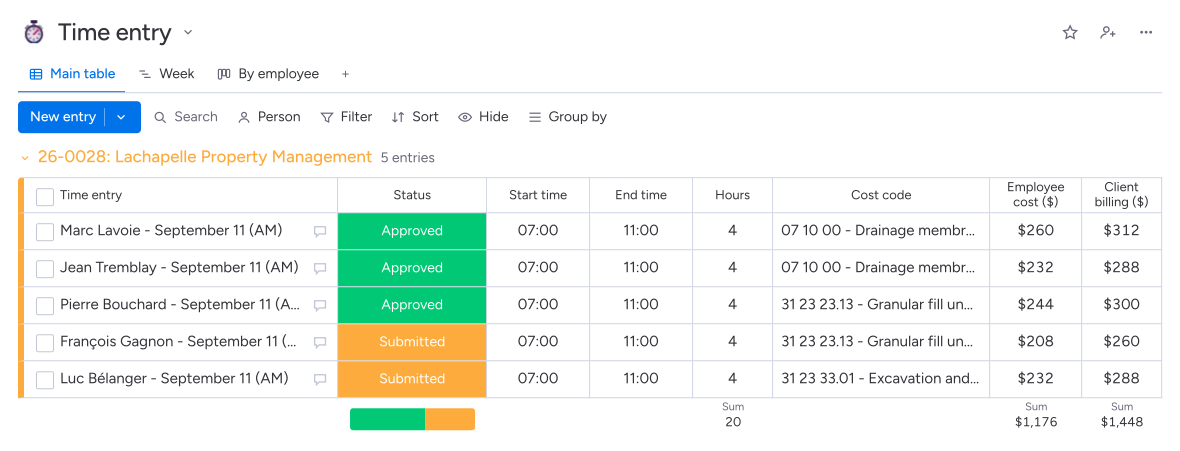
The cost rate calculates labour costs; the billing rate prepares the client invoice.
The phone stores hours offline and lets workers dictate their work description, even far from the office.
In Direction par Horizon, employees enter hours on their phones with the jobsite, job cost code and work performed. The supervisor checks the work periods, then the approver validates them. Approved hours feed the budget's labour cost and, on a time and materials contract, the invoice being prepared.
Yes. Horizon Clock, built into Direction par Horizon, stores hours entered offline until the connection returns. Employees select their jobsite, specify their break and can dictate the work performed. The office then finds this information in Time Entries to review it and have it approved.
Yes. The supervisor can review work periods and correct missing information. The designated person then approves the hours. Direction par Horizon assigns the project manager as approver when the entry is created and keeps the jobsite, work description and applicable rates with that period.
The system distinguishes the cost rate from the billing rate. It uses rates based on the trade, qualification level, sector and date of the work. The cost rate feeds the budget; the billing rate applies to time and materials contracts. Your office keeps the rates up to date.