Record quantities taken.
The lines retain materials and quantities. The office can see what was taken from the shop for the work.
Insulation taken from the shop has a cost for the jobsite too. Direction par Horizon tracks materials issued and returned, then posts their value after approval so it appears in the budget and the planned billing.

Materials issued from and returned to the shop feed job costs.
The lines retain materials and quantities. The office can see what was taken from the shop for the work.
The amount represents the value of the recorded materials. An approved return reduces the cost already posted to the jobsite.
The project manager approves or rejects the request. Approved movements then feed the budget.
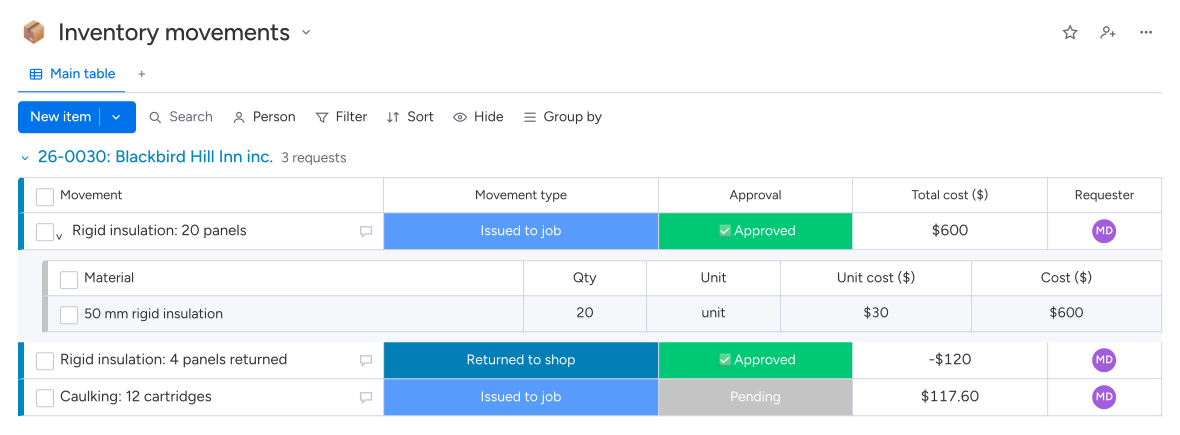
Materials taken from the shop enter the jobsite budget, even without a new supplier invoice.
For time and materials billing, approved issues and returns prepare positive or negative lines to review before invoicing.
The Inventory Movements module in Direction par Horizon records materials issued to a jobsite and returned to the shop. The team specifies items and quantities; the project manager reviews the request. After approval, their value reaches the budget and time and materials invoice lines, according to the contract.
The field lead records the item and quantity in a materials request. Direction par Horizon uses the unit, prices and job cost code from the catalogue. After approval, the cost is posted to the jobsite, even if the material came from an earlier shop purchase.
Your team records a material return and the quantities brought back. After approval, the system records a negative amount that reduces the cost posted to the jobsite. For a time and materials contract, a negative line also reaches the draft invoice, which administration checks before sending.
It tracks recorded issues and returns, their value and their allocation to jobsites. It does not calculate the quantities still available at the shop. Your team uses this register to track job costs and material lines to bill according to the contract.