Find the supplier invoice.
Each invoice keeps its identity in the records. The office checks the supplier and the jobsite link.
An invoice arrives: find the purchase it belongs to. Direction par Horizon prepares document reading and matching, then your team checks the supplier, jobsite and required documents before approving the expense.

Supplier invoices follow a shared approval process.
Each invoice keeps its identity in the records. The office checks the supplier and the jobsite link.
The subtotal stays visible before approval. The team checks the expense and its purchase order when one exists.
The status distinguishes expenses awaiting approval, blocked expenses and paid invoices. An approved invoice feeds the jobsite budget.
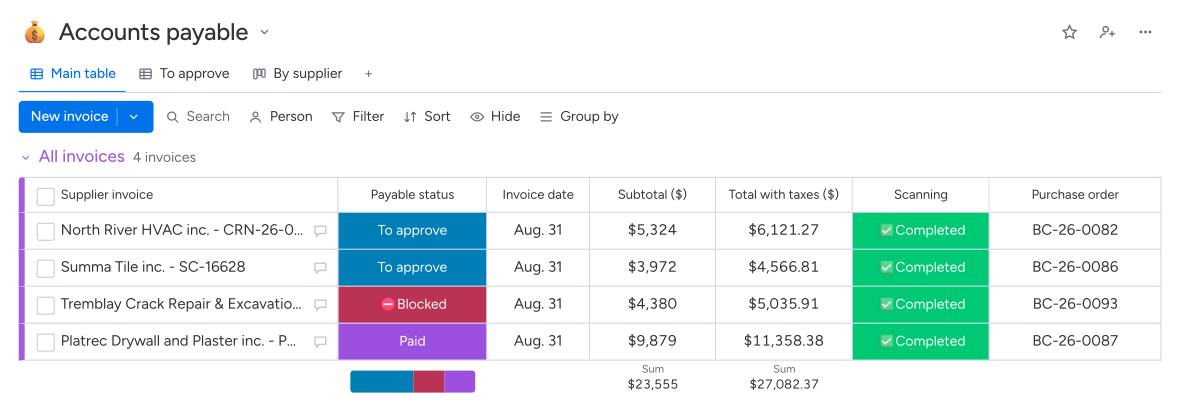
Expired compliance or a required document still awaiting receipt or approval can block the invoice.
For time and materials billing, the approved expense reaches the client invoice; a partial lien release is created when required.
Direction par Horizon reads supplier invoices and prepares matching with the supplier and purchase order. Your administration team checks the extracted information, jobsite and job cost code. The invoice then follows the planned approvals and document requirements. Once approved, the expense feeds the jobsite budget.
Reading prepares information for review: invoice number, dates, amounts and lines. The original document remains available in Payables. Your team confirms the supplier, purchase order and jobsite allocation, then corrects information as needed before requesting approval of the expense.
Your administration team can allocate the invoice directly to the project and its job cost code. When a purchase order exists, Direction par Horizon uses its references and flags an amount exceeding the remaining unbilled balance. Your team checks the match before submitting the expense for approval.
Accounting makes the payment in its usual software, then marks the invoice as paid in Payables. Direction par Horizon keeps the expense record, approval and jobsite allocation. Compliance and document requirements can be taken into account before approval.