Tap-to-clock-in
Workers see one big button. Tap it, GPS-verified, on the clock. Designed for one-handed use with gloves on.
GPS-verified time tracking for construction crews and field service teams, built into monday.com. The same boards your team already uses, now with a clock-in column that actually holds up on Friday at 5pm.
Contact us about the launch See how it works
Tool in development, built into monday.com · Not yet available on the monday.com marketplace
Foremen text workers Friday afternoon to confirm their week. Workers swear they clocked in at 7. The hours don't quite add up. By the time payroll's processed, half the data is reconstructed from memory and the other half is approximated. The margin pays for the gap.
Horizon Clock lives inside the monday.com boards you already use. Workers tap to clock in from their phone. GPS confirms they're on-site. Every shift becomes a monday.com item your team approves and reports on like any other piece of work. No second app, no parallel system, no spreadsheet to reconcile.
Workers see one big button. Tap it, GPS-verified, on the clock. Designed for one-handed use with gloves on.
Set a location and radius per job site. Clock-ins outside the area are flagged or blocked, your choice, your policy.
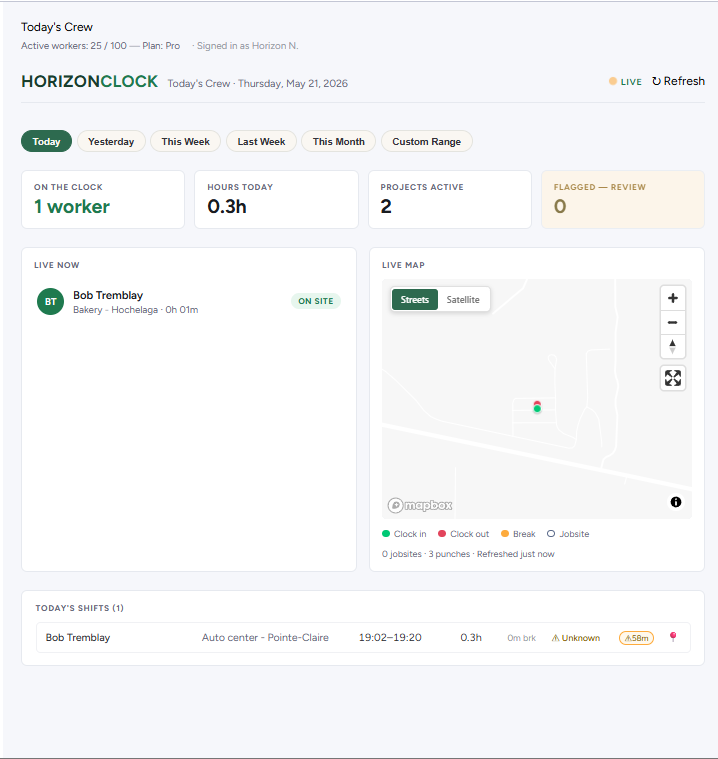
See who's on the clock right now, today's hours by worker, and every shift on a map. Refreshes every 30 seconds.
Shifts are monday.com items. Approve, edit, filter, report : everything happens inside your existing workflow. No separate tool to learn.
Horizon Clock is a tool built into monday.com, currently in development. At launch, an account admin will activate it from monday.com's apps section. One click.
Connect your existing Employees, Projects, and Time Entries boards (or let us create them). Set your overtime rules. Set your geofence policy.
Workers don't need a paid monday.com seat. Add them as free Viewers and they get clock-in access.
Workers open the Clock In view on their phone, tap once, and they're on the clock. GPS-verified.
Open the "Today's Crew" view to see who's on the clock right now, today's hours by worker, and a map for every completed shift.
"We're a Quebec-based monday.com agency. On every construction client's site, we kept hearing the same need: simple, reliable, auditable time tracking. So we built the tool we wished they had."
Horizon Clock is a tool built into monday.com, currently in development. It is not yet available on the monday.com marketplace and no pricing is set at this time. Get in touch to be notified at launch.
Your question isn't here? The full documentation covers setup, geofencing, billing and more.
Open the help centerNo. Workers use Horizon Clock as monday.com Viewers, which is monday.com's free tier. The tool is in development: billing details will be announced at launch.
Yes. Workers use the monday.com mobile app on iOS or Android. Horizon Clock runs inside that app. No separate Horizon Clock app to install.
Your monday.com Time Entries board (with all historical shifts) stays in your monday.com workspace under your control. Horizon Clock's internal database is wiped within 10 days of uninstall, per monday.com's app requirements.
Outdoor accuracy is typically 5-15 meters. Indoor or urban environments can be 30-100+ meters. Horizon Clock records the device-reported accuracy for every clock event so you can see how confident the GPS reading was.
Use monday.com's native CSV export or an approved payroll integration on the Time Entries board. Horizon Clock writes standard monday.com items, so tools with authorized access to monday.com data can read shifts.
In development
Horizon Clock is a tool built into monday.com, currently in development. Not yet available on the monday.com marketplace.
Contact us about the launch